
 Spanish
 Catalan
 English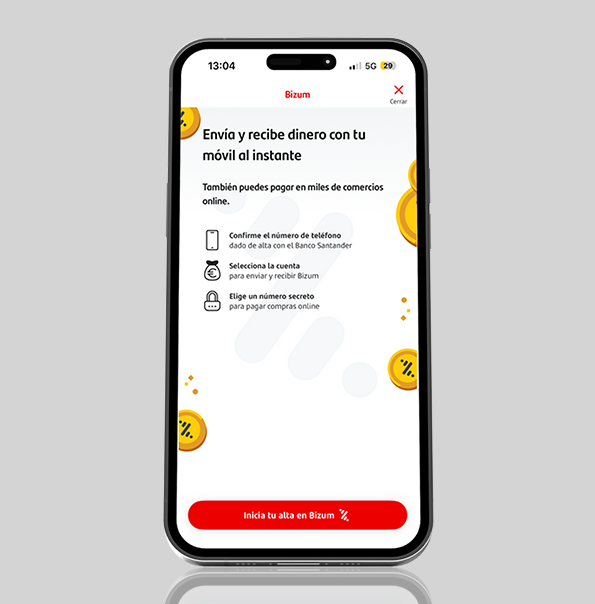
1
Sign up and accept Bizum’s Terms and Conditions in the App
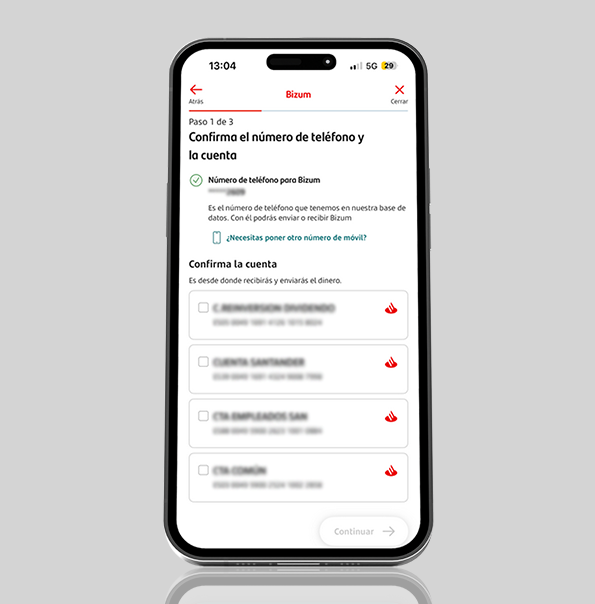
2
Confirm your mobile number and the account you will be using.
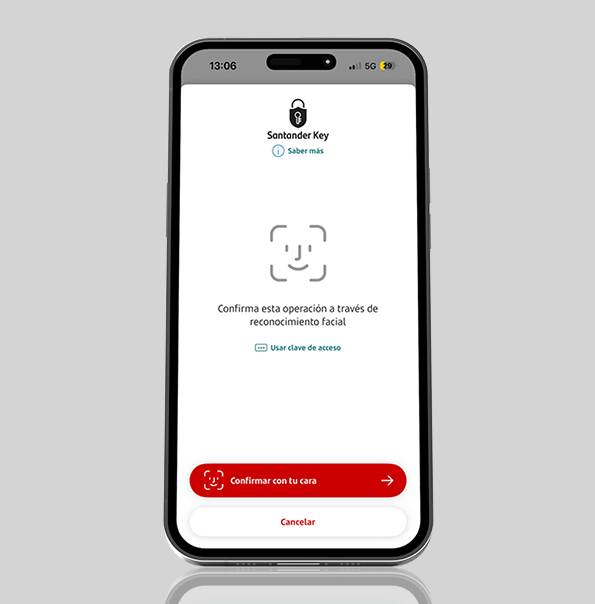
3
Confirm the registration with Santander Key
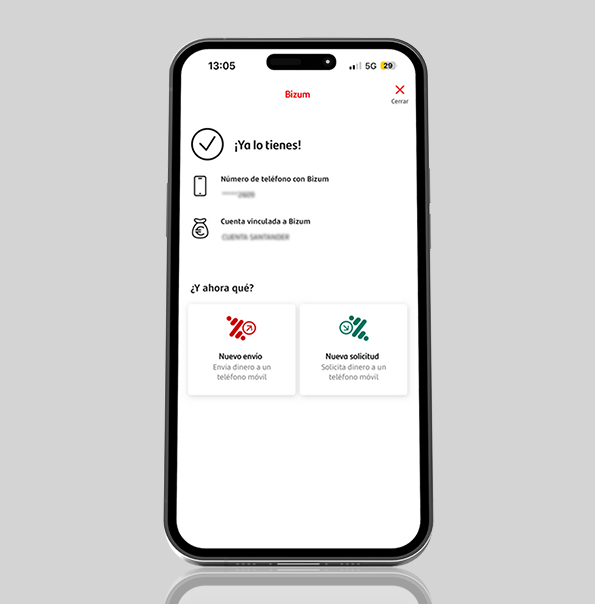
4
Mobile pay
Do it quickly and easily. Discover everything you can do.

Online shopping: fast and increasingly popular
Paying with Bizum for online purchases has become one of the preferred payment methods among consumers in Spain. It is fast, easy to use and with the security of confirming your transactions using Santander Key, making online shopping simpler than ever and enhancing the overall purchasing experiences.
How does it work in online stores?
The process is very straightforward:
Payment is completed within seconds, without you having to enter your card details or create additional accounts
More than 100,000 online merchants in Spain already accept Bizum!
Make your donation in just a few seconds. You can donate to any NGOs you want to support.
If you get a refund, congratulations! If you have to pay, we make it easy for you because you can do it online through the AEAT website.
You can now send or receive money instantly if your Portuguese friend uses MB Way or your Italian friend uses Bancomat Pay. In Andorra, the service keeps the same name as in Spain: Bizum2.
Plus, if you’d like, you can skip passwords and security codes altogether and confirm every Bizum payment using simply your fingerprint or Face ID.
All on your phone!
1
2
3
4
1
2
3
4
Bizum Santander is a free to use service integrated with the Banco Santander app that allows you to send and receive money and pay online instantly with just a mobile phone number. There's no need to know any bank details.
Just open the Santander app or go to online banking, register for the service, link your mobile phone number, and select the account you want to use. You don't need to download an additional app.
Yes. The recipient must be signed up for Bizum, although you can send them money regardless of which bank they use., regardless of their bank.
There are no fees for using the service, whether you’re sending or receiving money.
The money arrives instantly in the recipient's account, provided they have activated Bizum to receive it directly. If they don't have Bizum, they'll receive an SMS inviting them to activate the service and accept the money within 48 hours.
In stores that accept Bizum as a payment method, select this option, enter your mobile phone number and validate the transaction with Santander Key and the SMS code you will receive to confirm the payment.
The Bizum key was the code you used before 7 October 2025 to make online purchases if you did not have Santander Key. You can still make online purchases, but only with Santander Key.
Yes, you can make donations to NGOs through the Bizum directory in the Santander app or by using a 5-digit NGO code.
Yes. Plus, if you’d like, you can skip passwords and security codes altogether and confirm every Bizum payment using simply your fingerprint or Face ID.
Information of interest
1. See Bizum terms and conditions here. Bizum is a multi-bank service. Check the participating banks at www.bizum.es.
2. The EuroPA feature allows instant transfers to be sent and received between individual Bizum users and users of similar services in other countries within the SEPA zone, provided Bizum has interoperability agreements with those services. This feature will be activated gradually, starting with Portugal (through SIBS FORWARD PAYMENT SOLUTIONS, S.A.) and Italy (through BANCOMAT S.p.A.). The list of countries compatible with EuroPA may change, depending on Bizum's valid agreements and its technical availability. The experience will be very similar to the current Bizum experience, with some adjustments. You will need to enter the international country code for the recipient. It's important to note that the EuroPA feature will only be used when the recipient is not a Bizum user; this feature will not be available for Bizum users. Furthermore, EuroPA does not allow users to invite users from other similar services (an invitation message cannot be sent to the recipient). Nor does it offer portability, beneficiary-initiated payments (PULL mode), refund requests, multiple payments or the inclusion of additional messages in transfers.
3. Transaction limits: Maximum amount in each payment transaction: €1,000. Minimum amount for each payment transaction: €0.50. Maximum amount sent in one day: €2,000. Maximum amount sent in one month: €5,000. Maximum amount of transactions received by a customer in one day: €2,000. Maximum number of transactions received by a customer in one month: 60. Maximum number of requests issued by a customer in one month: 60. Maximum number of recipients that can be included when sending payments or in a multiple request: 30. Maximum amount per transaction between private individuals and online retailers: €15,000. Minimum amount per transaction: €0.01.
Have the bank on your mobile. Make transfers, manage your credit cards, withdraw cash from ATMs, review your expenses and more.

Learn about all the options you have to make purchases without having to take out your card, either with your phone or your watch.
Request your access code and signature code here by signing the multi-channel contract to be able to operate online and access the Santander apps.
Santander Blog
How to withdraw money without a card
Santander Blog
How to pay using your mobile